Picture

Picture
Showing posts with label Blogging. Show all posts
0

Friday Finds – July 3, 2009

Friday, July 3, 2009

A weekly collection of things I’ve run across that may be of interest to you.

Article  19 Presence Management Chores You COULD Do Every Day, by Chris Brogan – Great suggestions for anyone using social media tools to establish an online presence.

Video  Innovative Uses for Twitter for Small Business, Ralph Wilson interview Avinash Kaushik – Some great insights on using Twitter for business.  Avinash also shares some of the analytical tools he uses.

Article  HOW TO: Use Social Media for Enterprise Business, by Ben Parr – A look at some ideas to leverage social media for B2B companies.

Article  5 Uncommon Ways Your Business Can Use Twitter, by Darren Rowse – Some interesting ways you can utilize Twitter for business.

Tutorial  How To Send Personalized Mass Emails in Outlook, by Saikat Basu – A very good tutorial for using mail merge in Outlook.

Article  Will Your Small Business Use Google Wave? – A quick preview of Google’s collaboration tool Google Wave.

0

Quick Tip for LinkedIn: Websites & Feeds

Thursday, July 2, 2009

On Tuesday I posted a quick tip for customizing your website listing in LinkedIn.  This tip is a follow-on about making the most of the website you list.

BlogLink is a LinkedIn application that pulls in feeds from your connection automatically, so you get to see what they are up to in one spot.  And, if you set up your website listing properly, your data will filter into your connections BlogLink feeds.  So, how does this all work?  It’s quite simple, just follow the steps below.

Stay On Top of Your Connections

To keep up with what your connections are doing, simply navigate the the BlogLink application and add it.  Once you’ve added it, you then have the option to display it on your profile and/or your homepage.  When you add it to your profile, it will display the four most recent items of your feed in your LI profile.  Adding BlogLink to your homepage, you have the ability to see your connections feeds (as well as your own) right from your homepage.

5

What’s nice about this is that your connections do not have to be using BlogLink in order for you to get their feeds.  As long as they have a blog in their list of websites, they will show up in your feed.

Setting Up Your Feeds

The really neat thing about this is that all you have to do is make sure your blog is listed in your profile’s website listing.  What even cooler is that BlogLink, although primarily focused on blogs, will also pull other feeds such as Twitter.  As you can see below, I have this blog and my Twitter profile listed as websites.  BlogLink pulls both of these feeds automatically, which will appear on your LI profile as well as the feed of any of your connections using the application.

4

How Does All of This Look?

This first image below show what the BlogLink feed looks like on your profile.  This is what people would see when they visit your LI profile, if you choose to have it displayed.

6

This image shows you how the feed looks from your homepage.  Here you can view your connections’ feeds, or click on the By Me tab to see your own feeds.  Conversely, when a connection adds BlogLink you will appear in their feeds.

8 


For more information about BlogLink, including FAQs, visit their website.

Don’t forget to read my related post Quick Tip for LinkedIn: Customizing Your Website Listing if you haven’t already.  It provides information on setting up your website listing for your LI profile.

2

Using the RSS Reader, Bloglines

Monday, June 29, 2009

Bloglines is a great tool for following your favorite blogs.  This article shows you basic features that make it such a powerful reader.

There are many tools you can use to follow blogs.  I personally like Bloglines, which is a service provided by Ask.com.  It has a simple interface and is easy to use.

I admit, I was originally a Google Reader fan, simply because it was the only reader I knew of.  But I was never fond of the interface so I began to seek out other options.  After experimenting with some other readers, I came across Bloglines and fell in love.

Interface

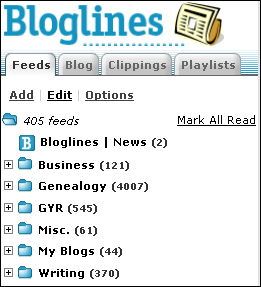
The interface is similar to Windows Explorer.  The left panel contains your feed list, while the right column displays the chosen feed.  Feeds can be displayed in an expandable format, meaning you can easily browse through the titles and then expand the ones you want to read (as shown below; other options are available, see Settings below).

 1

Categories

With Bloglines, you can categorize your feeds by creating separate folders.  When you subscribe to a feed using Bloglines, you have the option of creating a folder or you can simply store it at the top level.

3

Clippings

Another great feature is Clippings.  Clippings allows you to “clip” a blog post, which is then saved under the Clippings tab.  You also have the ability to categorize your clippings.  So for example, let’s say you find a great post, but don’t have time to finish reading it.  Simply clip it and save it for later.  Or let’s say you want to track the comments of a particular post and don’t want to subscribe to the blog’s comments.  Simply clip it and return to it periodically.

4 

5

Settings

You also have control over other options, such as how items are displayed.  For example, you can choose the “posting length”  to either display the entire post, a summary, or just the title (I display only the title as shown under Interface, above).  Below is a screenshot the shows the options that are available.

6

There you have it, the basic, yet powerful features of Bloglines. 

While I’m certainly a fan of Bloglines, I’d love to hear from you about other readers out there that you use and why.  Drop me a line in the comments.

0

Friday Finds

Friday, June 19, 2009

A weekly collection of things I’ve run across that may be of interest to you.

Book  The 4-Hour Workweek: Escape 9-5, Live Anywhere, and Join the New Rich, by Tim Ferriss – Tackles a new approach to the work/life balance issue.

eBook  BloggingBlueprint: Your Free Guide to Blogging Success, by Glen Allsopp – Glen shares his story and his secrets to his blogging success.  Free PDF download.

Article  Publishing Your Ezine the Pros and Cons, by Carrie Wilkerson – Great article that looks at the reasons why you should create an eZine and solutions for overcoming the two biggest obstacles of time and content.

Article  Marketing Your Website Without Search Engines, by Maki – Check out Maki’s practical advice on driving traffic to your site without relying on search engines.

Article  38 Things I Wish I Knew When I Started In Marketing, by Ian Lurie – A witty take on marketing, entrepreneurship, and business in general.

Article  Five Ideas I’ve Implemented to Get More Done, by Glen Allsopp – Need some productivity boosting ideas?  Read Glen’s article for some practical advice.

0

5 Social Media Gurus You Should Be Following on Twitter

Friday, June 5, 2009

These five gurus are a must-follow for social media insight.

  • Mari Smith – Social media consultant and Facebook expert.
  • Denise Wakeman – Blogging expert.
  • Jason Alba – Author of I’m on LinkedIn, Now What???.
  • Mike Stelzner – Social media enthusiast and creator of the Social Media Success Summit.
  • Ann Handley – Social media and Twitter expert.

  © Copyright 2008~2009. All rights reserved.

  © Blogger template 'Minimalist E' by Ourblogtemplates.com 2008

  © Header image credit: adapted from Chor Ip.

Back to TOP